Subscribe:

Ads 468x60px

Thursday, 30 May 2013

Gain Admin Privileges From Guest Account

Gain Admin Privileges From Guest Account


(Works only on Windows XP)
Most of you may have already seen a student of your college or school performing this hack on lab computer. Students generally don't have Administration privileges on lab computers to copy or install applications where they use this hack to gain some real stuff done on PC.

Vulnerability:
Windows command line task scheduler supports interactive mode which works somewhat same as sudo -i or su -i command in Linux/UNIX the only problem is that it does not ask you for password. This vulnerability is patched up in further versions of Windows than XP and works fine even in XP-3.

Procedure:
Open command prompt and type

c:\>time

and note the time, time will be presented in 24 hour clock format. Note this time.
Now open “Task Manager” by typing
“c:\>taskmgr”
now from processes and end explorer.exe .

Now type,

c:\>at [(time displayed in 24 hour clock format)+2 minutes] /interactive cmd.exe
for example
---
c:\>time
The current time is: 0:27:11.68
Enter the new time:
c:\>taskmgr
c:\>at 0:29:00:00 /interactive cmd.exe
--
Now type c:\>exit
and wait for two minutes. After two minutes command prompt will open in interactive mode with all administrative privileges without asking you for password. Now run any command from it it'll run with full administrative privileges so that you can even install programs and applications in system. So type “explorer.exe” in cmd and use system with administrative privilege even when you are in guest account.

Countermeasure: Disable command prompt for guest account.

By the way no college can ever disable command prompt because practicals are done over it, so guys get your stance and enjoy freedom.

Google Hacking

Google Hacking


Google hacking, most commonly misunderstood words by newbies as making queries on Google search to find out songs and movies. But it is just part of scope that Google hacking covers, experienced hackers will find this article as incomplete though it is stuffed with lot of things.

What is Google hacking:
Google hacking is term given to create and use complex queries on search box to get expected results from Google. But in reality it includes using each and every tool that is provided by Google as hacking weapon. Did I forget to mention Google Hacking is part of Reconnaissance, that means if you have skipped previous posts then it will be harder for you to understand power of Google Hacking. In this section I 'll show you using some of its applications as hacking related tool rest is left to your creativity.

Cached Pages:
I know each and everyone of you have some day used Google in spite of what your favorite search engine is. You must have seen a link to “Cached Similar” pages whenever you run any search query. Cached pages store history pages for its users like you and me. Cached pages is good source of tracking down website activities. Suppose site contains a file whose link is removed from main website, now you want access to that file, cached pages can help you out.

OK now please type “DAYS OF LIFE OF DEVIL” in Google and browse for cached pages, note differences between main site and cached site.

Google Translator:
You might not be knowing but you don't need proxy servers to bypass security because we already have a online proxy tool known as “Google Website Language Convertor”. This is Google’s online tool for converting language of website to your native language(The Language Convertor you can see on this website is nothing but derivative of this tool), the powerful feature of this Google applications is that it can be used as proxy server. When you'll type “Google Website Language Convertor” it'll open for you following link,
Now type URL of website you want select language conversion and press enter, if your page is already in language you want to browse it then select any language from “from” section and select your language in “to” section.

Basic Search Queries:

link:
This query searches for all links that ends to site mentioned after query.

inurl:
This query will search occurrences of word specified in URL 's.
Syntax: inurl:“NRUPEN”

site:
This query is used by combining it with other queries. So we will discus it later.

Intitle:
This query will search occurrences of word specified in title or website.
Syntax: intitle:“NRUPEN”

filetype:
This query will search occurrences of filetype specified.
Syntax: filetype:doc “Google hacking”

Directories And Files Listing:
Apache server by default uses “Index of ” type title to transverse navigation which can be exploited using Google queries to get specific file or folder.

Syntax: intitle:index.of “songs”

Now try to figure out what what above query will do.

Grabbing Banner:
Banner Grabbing is method in Scanning phase which is used for getting type and version of application. Here for now, we will skip it and will open our look for it while discussing scanning phase.

Combining Queries:
Now all above queries mentioned above can be combined to get powerful information from search engine via victim. It can open nearly everything about victim about software, hardware, documents if victim is unprotected against Google Crawlers. Depending upon your skills we leave how to use them combined for purpose but will show you how to combine them.

Try following one by one, one you use them you'll know which combination can be used when,

site:nrupentheking.blogspot.com + inurl:hacking

site:nrupentheking.blogspot.com inurl:hacking

inurl:admin inurl:php

Johnny Long:
Johnny Long maintains a website which keeps a brief database of using Google search queries. Browse for his name and you'll be lead to his website were you can click on Google Hacking Database to learn more than what we discussed here.

Google Hacking Tools:
There are several search quires that you can make using Google but remembering them is not that easy task so we have some ready made tools that do our job for us. Following are some of them,

Site Digger Tool: Uses Google hacking database to give out results from caches and also traces errors.

Gooscan: This tool also uses Google Hacking database and is also able to mark out vulnerabilities.

Google Hacks: It is one the most used Google hacking tools. Have very easy and understandable user interface, can solve all your download needs, must use tool for everyone.

Note: Please be sure we have not covered everything related to Google Hacking. I just gave some brush up so that you can practice them then I 'll cover Advanced Google Hacking, please note that maximum of our Google hacking queries are formed using above search queries so please practice, advanced Google hacking will be covered at last stage of reconnaissance phase. Please don't forget to ask whatever you were unable to understand in this post. Thanks for reading and keep visiting.

Sticky Key Method To Hack Windows Password

Sticky Key Method To Hack Windows Password


This is one of the old tricks that was used to hack windows password, it works even today is big surprise. So lets see how this works.

Vulnerability:
When you press shift, alt or ctrl for more than 5 times windows opens sticky keys options for you. But this is not vulnerability, vulnerability is that it even works when you are on log-in screen. Our this hack uses this vulnerability to hack administrator password, works nearly in all versions of windows.


Procedure:
To make this work first of all take a bootable CD, Linux live CD can be preferred. Now browse through “C:\Windows\System32” folder and search for sethc.exe file, this is the file which is called when you press shift, alt or ctrl more than five times. Rename this file to anything and search for cmd.exe file, create its copy and rename that file to sethc.exe. Now reboot your system when your log-in screen will appear press shift key more than five times command prompt will open in front of you. Type following commands,

c:\>net user
It 'll show you number of users of that system watch for “administrator”. If it is not present there type following commands for each user

c:\>net user <username>

and check its “Local Group Membership” for administrator. Once found administrator type following commands,

c:\>net use {administrator/user with administrator privileges} 12345

Press enter now login to administrator account with password 12345. By using above command you'll reset password of administrator to 12345. You can use any password that comes to your mind. Please try this on your virtual system(for more info on virtual system read “Basic Lab Setup For Hacker”).


Counter Measure: Disable all sticky keys option, its just that simple.

Note: I know I started windows hacking phase without completing reconnaissance/footprinting. But I think you'll get bored if we will continue only reconnaissance because reconnaissance is completely passive phase so I thought its better to keep things interesting. We will cover reconnaissance and windows hacking in parallel. Don't forget to tell me your views about above hack. Thanks for reading and keep visiting.

Getting Whois/Domain Information

Getting Whois/Domain Information


As mentioned earlier reconnaissance/foot-printing is very first step in hacking. In involves gathering all potential information about target system that may help attacker plan and execute attack. It is not bluff that attacker spends 90% of his/her time for this phase only then uses his/her technical skills to find and exploit weakness in system according to his/her conclusion.

Even foot-printing/reconnaissance involves various things depending on type of victim you are planning to attack. In this post we'll discuss how you can extract information like domain name, domain name provider, owner of domain, his/her name, address telephone number etc..

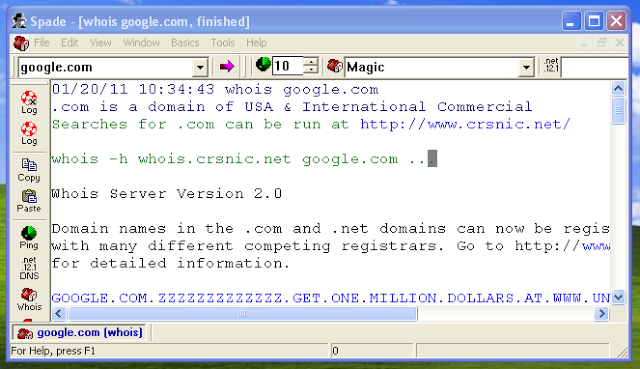
Whenever we purchase a domain it must be registered, this registry of domain names and their owner is known as domain information database and it is shared over internet for other users to get information about whether a domain is available for them or not. This information is also known as whois information of a domain. Here you will learn how to extract this information from database stored over network. Following is list of websites and tools that can help you extract this information.

Sam Spade (tool)
Smart Whois (tool)

You'll not require any skills to use these tools. They are very easy  to operate as taking a lolly pop from a kid, what really difficult is to analyze the information you will be getting after using them. In Sam Spade type name of domain you want to get information for example www.google.com and press enter.


My next choice is Smart Whois which also works like Sam Spade but the fact is that usually all prefer Sam Spade, even I am not exception. When Sam Spade will fetch you results look on left side, there you'll find several options try them one by one and analyze the result it had fetched for you.


Next is using websites that can fetch you that result. As you can see I mentioned three online tools but before you read further I must tell you there are thousands of websites and tools that can fetch you whois information, the one that are mentioned here are my personal preferences. Type domain name in search box of http://robtex.com and press “Lucky” and in http://whois.domaintools.com type domain name in search box and press lookup.

Do it yourself and ask if you encounter any problem.


From Where Spammers Get You E-mail Ids

From Where Spammers Get You E-mail Ids


I know many of you always receive a special kinda e-mail with advertisements known as spam and you might be asking yourself from where a spammer might have got your e-mail ID. So here's the answer, following are some of the methods via which spammers gets your email ids.

Social Networking Sites:
If you are a social network animal then you might be knowing that sometimes we just add anyone as our friend without even knowing who the person is. Reason, most of us just wanna show off that we have a big friend list. But there are some people who are actually preparing this friend list to get your e-mail ids. People hardly care about privacy settings and leave their telephone numbers and e-mail ids open for spammers to have a look on. Now how they extract your email ids, all major e-mail clients like gmail and yahoo provide their users with API(Application Programming Interface) to pull e-mail ids of friend list available on social networking sites. Once all emails are pulled spammer download this email list as excel sheet and your e-mail ids are now ready to get spammed.

Online Applications:
If you have ever used facebook then you might be knowing whenever you access any facebook application it asks for access to all your private data, once you allow application access you give your e-mail to them, now they can use it for any purpose.

Online Games And Contests:
Many people have habit of playing games online and contests that appears free with prize. The fact is that many people might be playing those games and only one gets prize via lucky draw. How much legitimate that appears. These contests are nothing but sure shot fundas of companies to grab personal details of people visiting their sites. How this pays them, this list helps them prepare job lists for eligible and needy persons thus they don't pay a penny for job recruitment and also gets an employee ready to work on minimum payments. Next they can use this list to spam you with advertisement of their own products or they may even plan to sell their e-mail list to spammers for hefty amount.

Job/Technology/Career/Game Fairs:
You might have seen many people standing with some kinda forms in these kinda fairs to lure people with job opportunity, free stuff delivery or contest, which actually never is the case. Such fairs are good targets since by spending just few bucks a contact list with several thousand e-mail IDS and phone numbers is built that too without anyone suspecting.

Online Forums:
Hey don't worry I don't mean they sell e-mail ids or their database are hackable. While on forums many people unknowingly don't set privacy settings, also they post their e-mail ids as it is as comment or reply. These e-mail ids can be extracted using software used for extracting e-mail ids.

Web Mail Extractors:
Web Mail Extractors are software that search websites for patterns like this “@domain.com/@domain.net,/@domain.org etc”. Once found they extract complete email ids and save them in their database. One such tool is “Web e-mail Miner”. For today I would advise you to download it and try to find out how it works. Don't worry about how to use it, you just have to enter name of site and press enter and it'll pull email for you. Try a name of famous online forum, guaranteed to get a list with more than thousand e-mails.

Improperly Configured or Unprotected Servers:
Usually company uses two kinds of domains/servers one valid of all and one valid only for their employees and customers. Sometimes these two are interconnected with each other for employees to make changes to website that is public. The internal server for employees usually contains lot of information about their employees and job recruitment in excel sheets or PDF files which can be opened using browser. If they are not configured properly “Web Mail Extractors” can easily crawl in revealing thousands of quality e-mail ids.

Knowingly or unknowingly we might have made many of above mistakes which has lead our e-mail ids open to spammers. To next section to this we'll learn how we can keep ourselves safe from getting spammed. Feel free to comment about what you think about above information. Thanks for visiting, have a nice time and keep visiting.

Steps Involved In Hacking

Steps Involved In Hacking :-


As mentioned earlier ethical hacker takes same steps as malicious hacker. Following are different steps that are performed during hacking.

1.Reconnaissance:
This step involves gathering potential information about target system. In fact hacker spends 90% of time for this phase only and next 10% time for rest of the steps.

2.Scanning:
During this phase network is scanned for vulnerability.

3.Gaining Access:
This is the step where real hacking takes place. Hacker takes advantage of vulnerability found in scanning phase and penetrates the victim system.

4.Maintaining Access:
After gaining access hacker makes provision to come back by planting root-kit and backdoor.

5.Covering Tracks:
In this phase hacker removes all traces of his/her presence in system by removing log files and event logs.

Basic Windows Commands That You Should Know


Basic Windows Commands That You Should Know


So in this section we will discus some of the most used basic commands of windows and frequently used switches with them. Now why the hell in world of Graphical User Interface (GUI) of windows I need to learn windows commands? Answer is, no matter how much cool the GUI appears, the most powerful feature of any OS till today is its shell when comes to control,I may hardly get any to disagree on this and shell is handled with the help of shell interpreter/emulator better known as command line in common, command prompt in windows and terminal/konsole/tsch/zch etc in Linux depending on shell emulator. As a hacker you must be able to master most of the commands and their most commonly used switches. So get ready to have a look on them,


attrib: (attributes) is used to set attributes of a file or folder.
Syntax: attrib filename/foldername
most commonly used switches includes: +h -h,+r -r,+s -s, /s /d
where 'h' means Hide attribute, 'r' means read,' s' means system,
'/s' means apply to files in folder and “/d” means apply to folders inside
'+' means apply attributes, '–' means remove attributes
Example: attrib +h +r +s /s /d c:\max
this will apply hidden, read only and system file attributes to all files and folders of folder max


cd/chdir: (change directory) is used to change directory.
Syntax: cd option
where option may include full path of folder where you want to jump.
Example: “cd d:\demo” will take you to demo folder in d drive in spite of where you are at present.
Cd .. go one step back.
Cd\ return to main drive.

Compact: Used to compress contents of folder without zipping or archiving them.
Syntax: compact options foldername
Options are 'c' means compress, 'u' means uncompress 'f' force compression
Example: This command is mostly used link this
compact /c /f folder_name
compact /u /f foldr_name

Copy: Used to copy files(not folder)
Syntax: copy /option source_file destination
Options can be left blank and mostly left blank. Most used switches includes 'a' which means ASCII file and 'b' which means binary file.
Example: copy c:\robot.txt d:\ this will copy robot.txt file from c to d drive.


Mkdir: used to crease folder
Syntax: mkdir drive\foldername or mkdir foldername
Example: mkdir max
mkdir a\b\c\v
Rename: used to rename file
Syntax: rename file1 file2
Example:rename max.txt dave.txt
this will rename max.txt to dave.txt

RD\Rmdir:(remove directory) Used to remove directory
Syntax: rmdir directory_name
Example: rmdir max
This will remove directory named max.

Other commands:
Date: Displays ans sets date.
Time:Displays and sets time.
Tasklist: Shows running processes

Taskkill: Used to kill a process rather than going in switch detail I 'll directly show you syntax to kill a process but first get process ID by executing Tasklist.
Syntax: taskkill /PID process_id /f
Example: taskkill /PID 1234 /f
Now so far as I think no one can remember all those switches so better try to use “command /?” this will open help pages for command. Note that we haven't yet covered all commands we just took an overlook over most basic windows commands, with time we'll move ahead and learn some really complicated commands and their switches. Till then I recommend you to try to run and execute all these commands and also try to find out other switches used while using commands by post-fixing commands with /? Commands like “set” and “net” may themselves need two to three posts like this so its better to cover them when need arrives. Till then if you have problem executing any of above commands feel free to ask.

Skills Required For A Hacker

Skills Required For A Hacker


Following are some must know things for a hacker or you can say requirements of hacker.

Operating System:
As a hacker you must have upper hand skills in Operating systems Windows, Linux and Unix. Once you master Linux and Unix you'll hardly face problem getting yourself on MAC. As we'll move further we will cover both of them in short and then slowly move our level to advanced.

Networking:
A hacker must have expertise in field of networking even if you don't have them you must be knowing about some basic terms used in networking. Please click on following links and try to grasp topics as thoroughly as you can.
OSI Model/Internet Protocol Stack
Network Topology
The reality is that a hacker should know networking to best level. Just knowing above terms is not sufficient though you'll not encounter that much problem while learning. We still recommend you buying a book on networking that should cover networking to level of pin points. My personal favor is to book Data Communication And Networking by Behrouz Forouzan if you want to start. Click on following link to know more, read people's view or if you want to purchase.

Data Communications and Networking (McGraw-Hill Forouzan Networking)


Knowledge About Setting Up And Configuring Servers:
Yes that is necessary for a hacker so when we will move ahead with flow. We will cover configuring IIS 7, Apache, Vertrigo on Windows and Apache on Linux. Both HTTP and FTP servers will be covered.

Programming:
Absolutely no one can deny all best hackers in world have master hand in programming. Following are must know programming languages but you can even make things work even if you don't know them. In any case I would recommend you learn programming.
HTML, C, C++, Java, SQL, Python, Perl, PHP and Ruby.
At most basic level my advise will be you must know HTML, C, SQL, PHP and ruby.


Tools:
Backtrack is platform which is specially crafted and designed for penetration testing. Metasploit is framework that is used to create and experiment with exploits and payloads. Both are must for a hacker today. Alternative to Backtrack is Knoppix Security Edition and Mautrix, if you master Bactrack you'll easily master both of them. So I will not leave them apart from our list, we'll also cover them.

Basic Lab Setup For Hacker

Basic Lab Setup For Hacker


In this tutorial we will discus how you can setup a lab for yourself to practice hacking on your system. At very basic level a hacker is in need of 2-3 systems with a Wired LAN or Wireless LAN. But if you are the one who has started just like me with just one laptop or computer then possibly there's no way you can match this setup. So following was my solution to start practicing with only one laptop or PC meeting above criteria of multiple computers connected in LAN. At most basic level following are your requirements.

Requirements:
A Computer:
First of all a computer which must have minimum following configuration.
A processor with 1.7GHz clock speed,
120GB + Hard disk
2GB RAM, Please note than your RAM must be above 1GB for practicing. If your RAM is less than 1GB or 1GB I 'll highly recommend you buy 512MB module extra or 1GB gigs for you.

A Virtual PC Emulator:
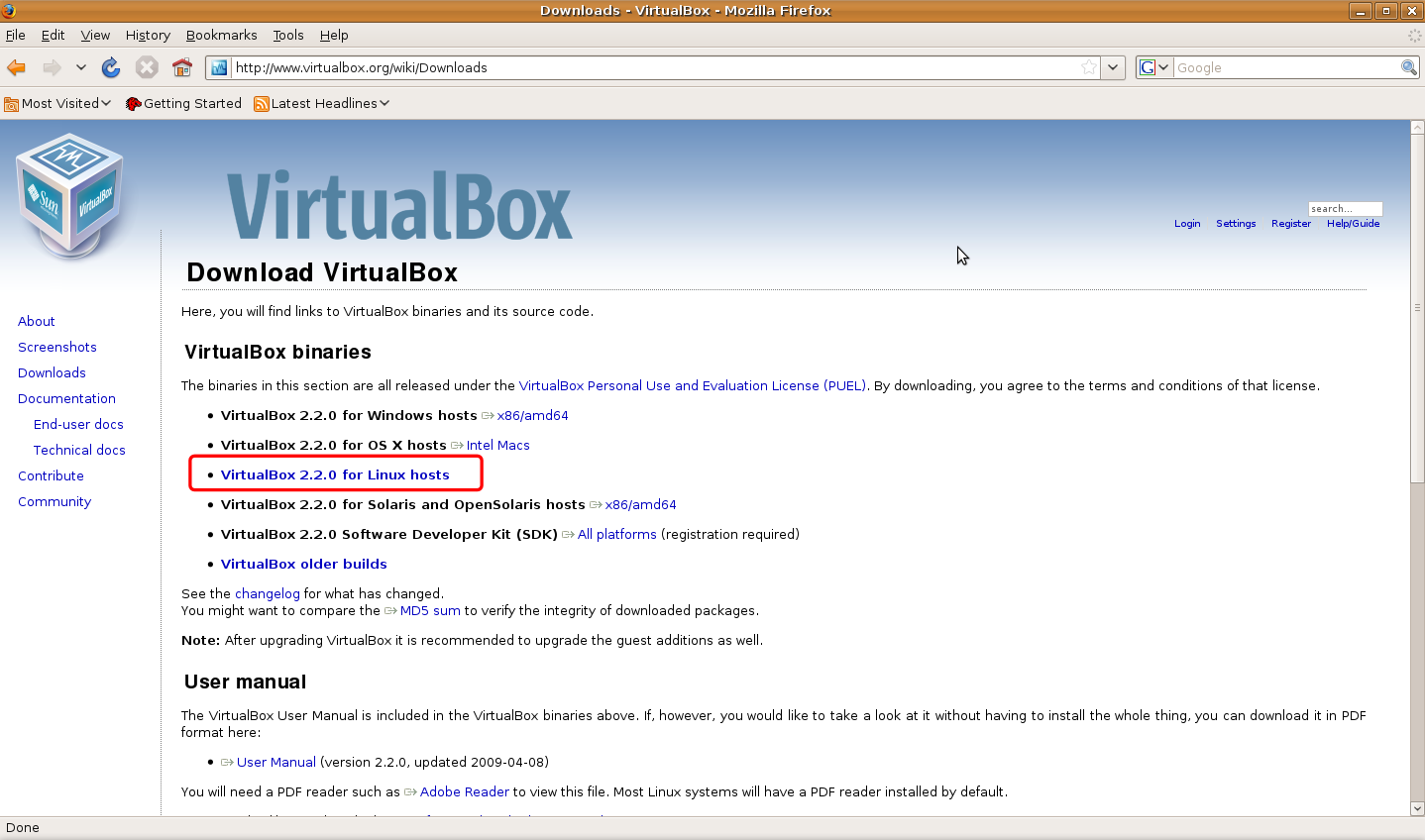
A virtual PC emulator is needed since I assumed you don't have multiple PC's to setup your lab, even if you have it I would prefer to advice you to use a Virtual PC Emulator. There are several options to pick from but our pick is “Oracle's Virtual Box”. Reason its open source means free, low on resources, supports all kind of network types, no problem to setup screen options, it automatically setups resolution once you install guest installation and have nearly all that features that a professional virtual PC emulator may have. Following is download link to virtual box latest version.


A professional choice is VM-Ware. You can purchase it from following link if you want to run it on Mac.
VMware Fusion4


Though VM-Ware have several advantages over Virtual Box, virtual box is just good to go. Prefer it if you want to shed money.


An Online Synchronization Service:
If you think even that needs shedding money, then I want to assure there's again a free alternative available, its name is Drop Box. Go to : www.dropbox.com  and create your personal free account then download its setup file and install for synchronization.

A Static IP Address:
Now that will be problem to get a static IP address since a static IP Address may cost you nearly $100 I.e approximately Rs.5000. But don't worry about it we have a free alternative solution to counter problem of static IP. So when there'll be need I 'll clear how to tackle it else even if you have money to shed I will not recommend it.

A PC restore utility:
There are no free alternative to PC Restore Utilities so we will work out on evaluation version. Download Farconics Deep Freeze 


IP Address Hiding Utility:
Proxy Servers, Anonymizors and VPS are some IP address hiding options. We will discuss them when their need will come in to play.

High Speed Internet Connection:
Of course when you want to learn hacking you need a high speed Internet connection. Opt for a USB dongle by BSNL, TATA, Reliance as mobile broadband and BSNL land-line broadband is just much better option. If you don't have high speed connection and you work on slower connection like GPRS and dial-ups its hard to learn hacks done over Internet.
Procedure:
Before you proceed create a separate partition for installation of Virtual system, the partition must be at least 15GB in size. First of all download latest version of Oracle's Virtual Box and install it on your system. While installation it'll ask several times about installing various components just press OK for all of them because you'll need them all.
Once installation is done virtual box will come up with several pop ups when you'll be using it, please read each pop up because they are your tutorials to master “Virtual System Environment”. Please please please, don't skip any of those pop ups. When your installation will be over you'll see virtual system isn't really working in full screen. To tackle it run virtually installed system click on devices and “Install Guest Additions”. From next time it will run in full screen.

Setting up virtual system is done, now jump up to the next part start your virtual system open web browser of virtual system and download Drop-Box application and sign in to it. Now onwards whenever you'll download any software for hacking paste it into Drop Box default folder, it'll synchronize it with your online storage. After installing and signing up Drop Box download Deep Freeze don't install it now. Shut down your Virtual System and copy virtual hard disk as backup in another folder, start system and install Deep Freeze, before installing it read its online manual so that you should not get problem using it. Now when your Deep Freeze evaluation time expires just delete older hard disk and copy the backup and start over again. This will keep your evaluation copy last forever. If you haven't yet understood what we actually did with virtual box then I should clear we just setup a Virtual LAN for our practice using just a single computer. So you can't now boast you don't have a LAN to practice or a remote host to practice. You can run two virtual systems simultaneously if you have at least 2GB RAM. This not only solves our problem of private LAN to practice but it indirectly also offers you remote host to attack on. Our personal say is don't install virtual system on Windows XP or Vista, get Windows 7 or Server 2008.

Lab setup tutorial is over now go and setup your systm to get started. Please ask if you have got any problems related to setup, if everything is fine please don't forget to convey me. Thanks for reading keep visiting.

Ethical Hacking | An Introduction

Ethical Hacking | An Introduction


Whenever term hacker comes before many people consider it as a guy sitting inside a room or garage with a bottle or beer and a Laptop or Desktop doing wonders on click of buttons. But the reality check is hacking is not that easy as portrayed in movies and television and term hacker doesn't mean a computer criminal.

So here first of all we'll clear all our misconceptions related to words hackers and hacking.

From Where This Word Came:
The word hacking has history in late 1960's, the time when computers were nothing but mighty pieces of machines and a computer just meant a machine that can compute. Electrical and Electronics geeks used to optimize circuits to make any system/circuit work faster, better and reliably. The job they used to do on circuits was known as hack. With time computer geeks also started finding way out to optimize their system to work better so in fact hacking was nothing but always a kind of reverse engineering. With time in professional world a word hacker got meaning, a person who is highly skilled in hardware, software and networking components. Then movies started portraying hackers do only dirty works and hence today the word hacker has a negative face according to people. No matter how the word met to a dreadful end a hacker always had all qualities that was first put forward in its definition may the be criminal or ethical. Criminal hackers are also known as Crackers.

Types Of Hackers:


White Hats: White hat hackers are good guys who use their hacking skills for defensive purposes. Organizations and industries pay them high salaries to protect their systems and networks from intrusion.


Black Hats: Black hats are actually bad guys in filed. Their main job is to breach security and make money. They make money by using their hacking skills for offensive purposes.


Grey Hats: Gray hats are hackers who work for offensive and defensive purposes depending on situations. They are hired by people to intrude and protect systems.


Hactivist: A hacktivist is kinda hacker who thinks hacking can bring out some social changes and hacks government and organizations to show his discomfort over some trivial issues.

Suicide Hackers: Suicide hackers are those who hack for some purpose and even don't bother to suffer long term jail due to their activities. They can be bad as well as good.

Script Kiddie: A script kiddie is a person who boasts breaking system using scripts and codes written by others though he hardly knows what the code does.

Phreak: It is a person who tries to intrude systems for fun or malicious personal activities. Mostly they are children of age 12-15 who don't even know wrong consequences of hacking.

Types Of Hacking:

Local Hacking: This type of hacking is done when a hacker has full access to the system to implant a virus, keylogger and RATs

Remote Hacking: Remote hacking is done on a remote system using Internet.

Social Engineering: Social Engineering is kinda interacting skill that a hacker uses to manipulate people giving out sensitive information. Its kinda trick done using good verbal, social skills and understanding.

Terminologies Used Under Hacking:

Threat: A threat is an environment or situation that could lead to a potential breach of security. Ethical hackers look for and prioritize threats when performing a security analysis.

An Exploit: An exploit is a piece of software that takes advantage of a bug, glitch, or vulnerability, leading to unauthorized access, privilege escalation, or denial of service on a computer system.
Vulnerability: A vulnerability is an existence of a software flaw, logic design, or implementation error that can lead to an unexpected and undesirable event executing bad or damaging instructions to the system. In easy word vulnerability is weakness in system.

Payload: Payload is agent that helps in taking advantage of vulnerability in remote hacking.

Attack: An attack occurs when a system is compromised based on a vulnerability.

Types Of Attack:

1.Operating System Attack
2.Application level Attack
3.Shrink Wrap Code Attack
4.Misconfiguration Attack

Operating system attack is attack done on specific type of OS. Such attack is done using flaws in programs and services shipped with OS. Application level attack is done over faulty coding practices done over software during its development. Shrink Wrap Code attack are attacks done over UN-refined scripts used for making task simpler. Last is misconfiguration attack, it is kinda attack which is done over mis-configured system or a system with default settings.


Work Of An Ethical Hacker:
Job of an ethical hacker is to use all his skills and tools used by malicious hackers to find vulnerabilities in system and then provide it security against those vulnerabilities.

Conclusion: At last what I want to tell, nothing happens in clicks of buttons. A hacker is highly skilled person in field of computing who usually have ample knowledge about software, hardware, OS, networking and programming. A hacker may it be criminal or ethical has immense patience, determination, organization, discipline and persistence. An attacker may spend months of time planning, analyzing and executing an attack. This shows his level of dedication to achieve whatever goal he/she has set. A person can never become a good hacker unless he have all above qualities.

Note: Now onwards we will cover hacking as our main stream topic on this blog. Real hacking is never done over lamers who hardly knows about security, it is done over a person who is highly skilled as you are. You can never learn hacking until you do some practical and gain knowledge about field so now onwards I urge you to perform practicals that will be now posted on this blog on your own system. Next no tutorial will be taken as a lamer so they will be in possible higher details, so this may happen that you may not understand something. Rather than keeping yourself mum I plea you to please ask whenever you encounter a problem or get bothered by topic. Whenever I 'll post on hacking I 'll try to keep a theoretical and one practical tutorial, you are requested to read both and grasp matter completely. Thanks for visiting and please tell are you clear with all points discussed or need some explanation on your difficulty.